开始使用TypeScript
使用前准备
- 需要有
node环境和npm包管理器(安装node同时会自动安装npm包管理器)下载地址。 - 编辑器(推荐使用
vscode)
安装TypeScript
使用 npm 全局安装 typescript
npm install typescript -g

# 查看 typescript 版本
tsc -v
创建项目环境
- 创建项目目录
mkdir learn-typescript && cd learn-typescript
- 创建
src目录和index.ts文件
# bash
mkdir src && touch src/index.ts

# PowerShell
# mkdir src && cd > src/index.ts
# 新版本PowerShell有可能报错,提示标记“&&”不是此版本中的有效语句分隔符。则使用“;”进行分割
# mkdir src ; cd > src/index.ts
- 初始化
package.json配置文件
npm init
- 初始化
tsconfig.json配置文件
# 已经全局安装了typescript,才能使用tsc命令
tsc --init
- 配置
tsconfig.json和package.json
tsconfig.json
{
  // 可以通过 compilerOptions 来定制你的编译选项
  "compilerOptions": {
    "target": "es5", // 指定 ECMAScript 目标版本
    "module": "commonjs", // 指定使用模块: 'commonjs', 'amd', 'system', 'umd' or 'es2015'
    "moduleResolution": "node", // 选择模块解析策略
    "lib": ["es6", "dom"], // 指定要包含在编译中的库文件
    "outDir": "./dist", // 指定输出目录
    "allowJs": true, // 允许编译 javascript 文件
    "checkJs": true, // 报告 javascript 文件中的错误
    "removeComments": true, // 删除编译后的所有的注释
    "importHelpers": true, // 从 tslib 导入辅助工具函数
    "strict": true, // 启用所有严格类型检查选项, 等于其它选项的总开关,开启该项等于开启所有的严格模式配置。
    // "alwaysStrict": true, // 以严格模式检查模块,并在每个文件里加入 'use strict'
    // "strictNullChecks": true, // 启用严格的 null 检查
    // "noImplicitAny": true, // 在表达式和声明上有隐含的 any类型时报错
    // "noImplicitThis": true, // 当 this 表达式值为 any 类型的时候,生成一个错误
    "noUnusedLocals": true, // 有未使用的变量时,抛出错误
    "noUnusedParameters": true, // 有未使用的参数时,抛出错误
    "noImplicitReturns": true, // 并不是所有函数里的代码都有返回值时,抛出错误
    "experimentalDecorators": true, // 启用装饰器
    "emitDecoratorMetadata": true, // 为装饰器提供元数据的支持
  },
  // 使用 include 和 exclude 选项来指定需要包含的文件和排除的文件:
  "include": [ // 需要编译的ts文件,*表示文件匹配,**表示忽略文件的深度问题
    "./src/**/*.ts"
  ],
  "exclude": [
    "node_modules",
    "dist",
    "**/*.test.ts",
  ]
}
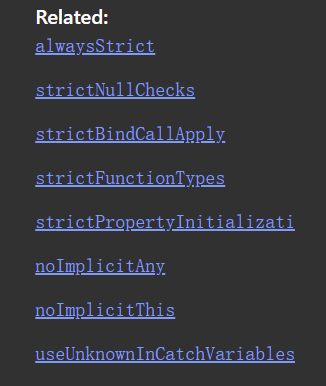
strict 相关的编译选项,开启该项等于开启以下所有项。
tip
使用 globs:**/*
示例用法:some/folder/**/*,意味着匹配所有的文件夹和所有文件(扩展名为 .ts/.tsx,当开启了 allowJs: true 选项时,扩展名可以是 .js/.jsx)。
package.json
{
  "name": "learn-typescript",
  "version": "1.0.0",
  "description": "",
  "main": "src/index.ts",
  "scripts": {
    "build": "tsc", // 使用tsc进行编译
    "build:w": "tsc -w" // 监听文件,有变动即编译
  },
  "keywords": [
    "typescript"
  ],
  "author": "",
  "license": ""
}
编写第一个 TypeScript 程序
index.ts
function hello(name) {
    return "Hello, " + name
}
hello('TypeScript')
这个时候你会看到一个警告,这个警告在官方默认配置中是不会出现的,正是由于我们开启了 noImplicitAny 选项,对于隐式含有 any 类型的参数或者变量进行警告
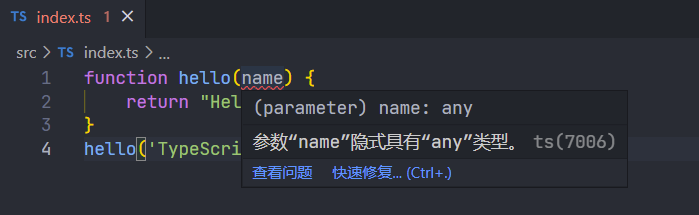
之所以一开始就开启严格模式,是因为一旦你开始放任 any 类型的泛滥,就会把 TypeScript 变成 AnyScript ,所以最好从一开始就要用规范的 TypeScript 编码习惯
我们为 name 参数添加 string 类型,修改如下:
index.ts
function hello(name: string) {
  return "Hello, " + name
}
hello('TypeScript')
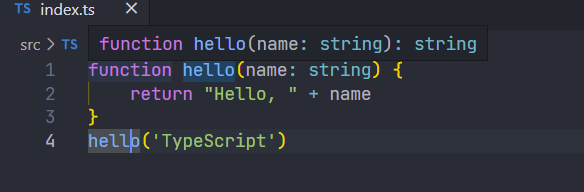
移动到函数 hello 上,此时我们可以看到,hello 函数会自动加上返回值的类型,这是 TypeScript 自带的类型推导。
查看编译结果
执行编译命令脚本
# 可以使用tsc进行一次编译
npm run build

# 或者监听文件,有变动即编译
# npm run build:w
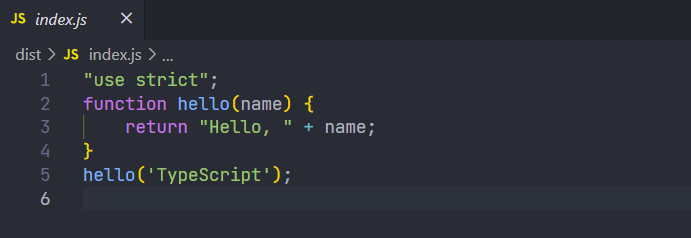
因为在 tsconfig.json 文件配置中,指定了编译后的 js 文件输出的目录,为当前项目的 dist 文件夹
所以我们可以打开 dist 文件夹看到编译后 js 文件,打开 index.js,可以看到 hello 函数被编译后的输出结果